> ## Documentation Index
> Fetch the complete documentation index at: https://docs.anchorage.com/llms.txt
> Use this file to discover all available pages before exploring further.
# Trusted destinations
> Allowlist external addresses and bank recipients before making external transfers or withdrawals.
export const Check = () => ;
export const Cross = () => ;
A **trusted destination** is an allowlisted external address or USD bank recipient. Adding one requires quorum approval. Once allowlisted, it can be used across the iOS app, web dashboard, and APIs.
## What you can do where
| Operation | API | Web dashboard |
| :------------------------------------------- | :-------- | :------------ |
| View trusted destinations | | |
| Create (digital assets) | | |
| Create (USD bank recipient) | | |
| Delete | | |
| Edit | | |
| Batch upload | | |
| Network-level destination (`isNetworkLevel`) | | |
For USD bank recipients, add them in the web dashboard by selecting **Fiat** as the type. For the step-by-step flow, see [Adding a USD trusted destination](/knowledge-base/platform/users/usd-banking#adding-a-usd-trusted-destination) in the USD banking guide. You can list fiat trusted destinations via API today by filtering on `type == "fiat"`.
Creating, editing, and deleting fiat trusted destinations via API is in development. This section will be updated with endpoints and examples once it's available for testing.
## Sending to your own org's addresses
You can allowlist addresses that belong to your own organization as trusted destinations to tag and label critical internal addresses. This is purely a convenience for recognition — it isn't required for internal movement.
If your concern is avoiding per-transaction quorum when moving assets between your own wallets, use the [internal transfer API](/knowledge-base/platform/developers/move-money/transfer/crypto#internal-transfer) instead. Internal transfers set both `source.type` and `destination.type` to `WALLET` and don't require a trusted destination, allowlisting, or AML information.
## Create a trusted destination via API
Requires the `Manage Trusted Destinations` permission. Adding a trusted destination requires quorum approval.
```json theme={null}
// POST /v2/trusted_destinations
{
"idempotentId": "{unique ID}",
"trustedDestinations": [
{
"address": "{address}",
"assetType": "{asset}",
"name": "{name}",
"description": "{description}",
"isNetworkLevel": true,
"memo": "{memo}",
"trustedDestinationAmlQuestionnaire": {
"destinationType": "FINANCIAL_INSTITUTION",
"institutionName": "{institution name}",
"institutionCountry": "US",
"recipientType": "MY_ORGANIZATION"
}
}
]
}
```
Set `isNetworkLevel: true` to let the destination receive any asset on that network (digital assets only).
## `trustedDestinationAmlQuestionnaire` fields
Required for Anchorage Digital Bank clients adding trusted destinations via API.
| Field | Description |
| :----------------------- | :---------------------------------------------------------------------------------------------------------------------------------------------------- |
| `destinationType` | `FINANCIAL_INSTITUTION` (for example, a crypto exchange) or `SELFHOSTED_WALLET` (for example, a hardware or browser wallet). |
| `destinationDescription` | Name of the custodial provider. |
| `destinationCountry` | Two-letter country code where the provider is incorporated. Required for `FINANCIAL_INSTITUTION`. |
| `recipientType` | Ultimate beneficiary: `DESTINATION_INSTITUTION`, `MY_ORGANIZATION`, `PERSON`, or `ENTITY`. Use `MY_ORGANIZATION` for your own address at an exchange. |
| `recipientName` | Name of the beneficiary. Required for `PERSON` or `ENTITY`. |
| `recipientCountry` | Two-letter country code of the beneficiary. Required for `PERSON` or `ENTITY`. |
## Connect a trusted destination to an API key
If you're using the Transfers API to transfer to a trusted destination, you need to configure your API key's permission group to allow it. There are two options, set when configuring the **Transfers outside Anchorage** permission on your API key.
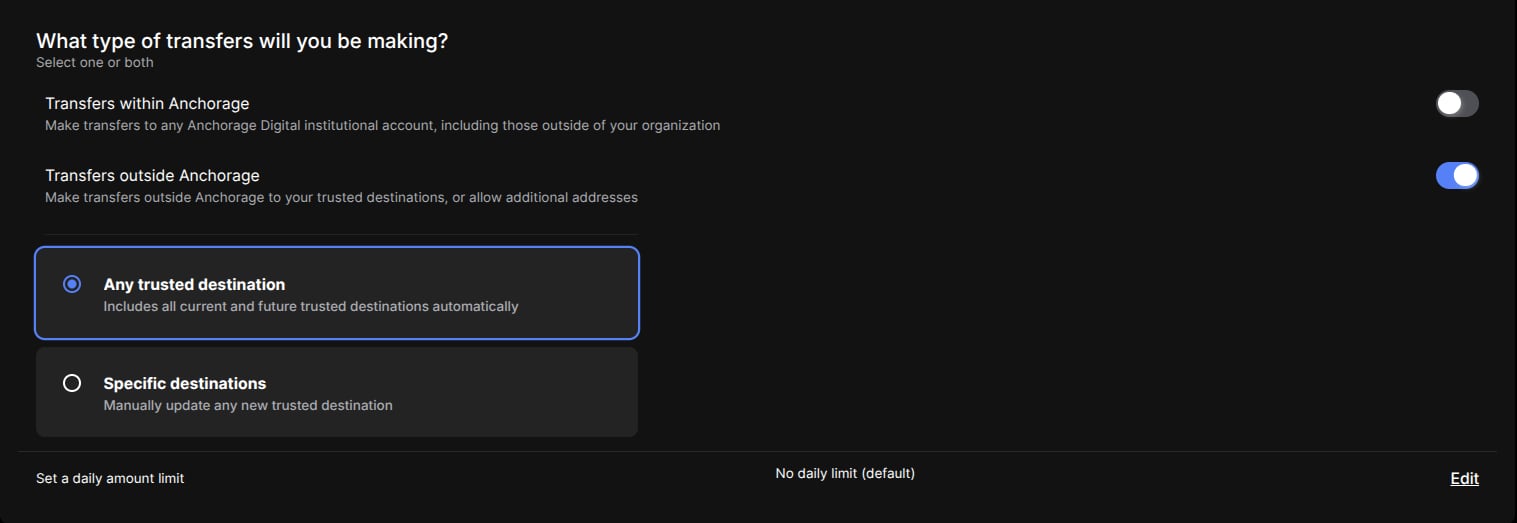 ### Specific destinations (default)
By default, your API key is scoped to **Specific destinations**. Once a trusted destination has been added and approved, you must also add it to the API key's permission group before you can transfer to it. See [Permission groups and API keys](/knowledge-base/platform/developers/move-money/setup/permission-groups) for the step-by-step flow.
Fiat trusted destinations can't be added to a permission group's specific-destinations list. If you're transferring USD to bank recipients via the Transfers API, you must select **Any trusted destination** instead.
### Any trusted destination
You can select **Any trusted destination** when configuring your key to automatically allowlist all current and future trusted destinations for that key. This removes the need to manually update the permission group each time a new trusted destination is approved. This option is required for [USD transfers](/knowledge-base/platform/developers/move-money/transfer/usd#external-transfer) to fiat trusted destinations.
## APIs
| API | Description |
| :----------------------------------- | :---------------------------------------------------------------------------- |
| List trusted destinations | Returns trusted destinations. Filter on `type == "fiat"` for bank recipients. |
| Create new trusted destinations | Allowlists one or more destinations. Requires quorum approval. |
| Check status of trusted destinations | Returns the approval status of a pending destination. |
| Delete trusted destination | Removes a destination. |
### Specific destinations (default)
By default, your API key is scoped to **Specific destinations**. Once a trusted destination has been added and approved, you must also add it to the API key's permission group before you can transfer to it. See [Permission groups and API keys](/knowledge-base/platform/developers/move-money/setup/permission-groups) for the step-by-step flow.
Fiat trusted destinations can't be added to a permission group's specific-destinations list. If you're transferring USD to bank recipients via the Transfers API, you must select **Any trusted destination** instead.
### Any trusted destination
You can select **Any trusted destination** when configuring your key to automatically allowlist all current and future trusted destinations for that key. This removes the need to manually update the permission group each time a new trusted destination is approved. This option is required for [USD transfers](/knowledge-base/platform/developers/move-money/transfer/usd#external-transfer) to fiat trusted destinations.
## APIs
| API | Description |
| :----------------------------------- | :---------------------------------------------------------------------------- |
| List trusted destinations | Returns trusted destinations. Filter on `type == "fiat"` for bank recipients. |
| Create new trusted destinations | Allowlists one or more destinations. Requires quorum approval. |
| Check status of trusted destinations | Returns the approval status of a pending destination. |
| Delete trusted destination | Removes a destination. |