> ## Documentation Index
> Fetch the complete documentation index at: https://docs.anchorage.com/llms.txt
> Use this file to discover all available pages before exploring further.
# Example policy setups
> Configure vault policies for common goals, including trusted-destination-only withdrawals, lighter approvals on vetted transfers, and restricted vaults.
This page shows how organizations can combine policy rules with different conditions and outcomes to meet specific security goals. Each setup is built from the controls described in [Rules](/knowledge-base/platform/users/rules) — there's nothing to install or request, and no preset to apply.
Every setup below is a vault policy. The **Block** [outcome](/knowledge-base/platform/users/rules#outcomes) isn't available on the administrator policy, so organization-level operations such as user management always resolve to quorum.
Reject any withdrawal to an address that isn't a trusted destination
Keep full quorum for new destinations, reduce it for known ones
Block everything in a vault except the activity you intend
## How to read these setups
Each setup lists the rules in a policy in evaluation order. Anchorage Digital works down the list, applies the first rule that matches the operation, and resolves that rule's outcome.
A policy holds at most one conditional rule, and it always sits above the base rule for the same operation. See [Conditional rules](/knowledge-base/platform/users/policies#conditional-rules) for how the two fit together, and [Adding a conditional rule](/knowledge-base/platform/users/rules#adding-a-conditional-rule) for the steps.
## Restrict withdrawals to trusted destinations, block every other operation
Assets can only leave to an address your organization has already vetted and approved. Anything else is blocked before it reaches an approver.
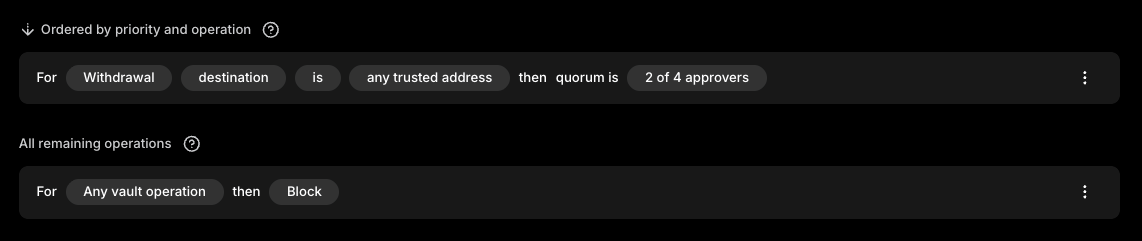 | Order | Operation | Condition | Outcome |
| :---- | :------------------ | :--------------------------------- | :----------------------- |
| 1 | Withdrawal | Destination is any trusted address | Quorum, 2 of 4 approvers |
| 2 | Any vault operation | None | Block |
A withdrawal to a trusted address or to another vault on this policy matches the first rule and proceeds to quorum as normal. Every other vault operation falls through to the base rule and is blocked when you preview it.
This turns your trusted destinations into a hard control rather than a convenience. Adding a trusted destination still requires quorum approval up front under your administrator policy, so the vetting step stays intact — see [Trusted destinations](/knowledge-base/platform/users/trusted-destinations).
The outcome applies to the operation itself, not to where it started, so a withdrawal submitted through the API is rejected on the same terms as one started in the iOS app or web dashboard.
## Require fewer approvals for vetted withdrawals
A higher number of quorum approvals still applies to a withdrawal heading somewhere new (or other operations), but movement between vaults using the same policy and to trusted destinations clears with just a single approval.
| Order | Operation | Condition | Outcome |
| :---- | :------------------ | :--------------------------------- | :----------------------- |
| 1 | Withdrawal | Destination is any trusted address | Quorum, 2 of 4 approvers |
| 2 | Any vault operation | None | Block |
A withdrawal to a trusted address or to another vault on this policy matches the first rule and proceeds to quorum as normal. Every other vault operation falls through to the base rule and is blocked when you preview it.
This turns your trusted destinations into a hard control rather than a convenience. Adding a trusted destination still requires quorum approval up front under your administrator policy, so the vetting step stays intact — see [Trusted destinations](/knowledge-base/platform/users/trusted-destinations).
The outcome applies to the operation itself, not to where it started, so a withdrawal submitted through the API is rejected on the same terms as one started in the iOS app or web dashboard.
## Require fewer approvals for vetted withdrawals
A higher number of quorum approvals still applies to a withdrawal heading somewhere new (or other operations), but movement between vaults using the same policy and to trusted destinations clears with just a single approval.
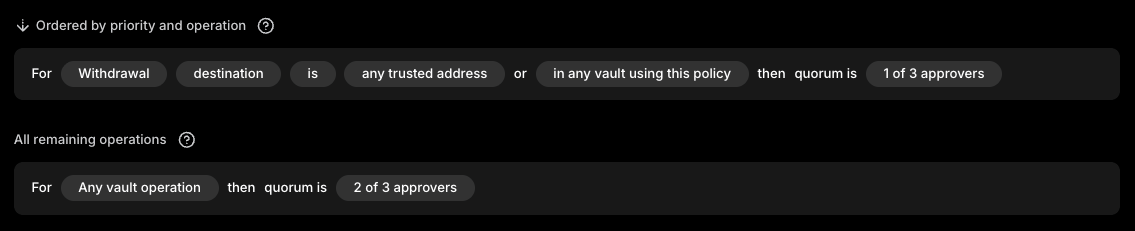 | Order | Operation | Condition | Outcome |
| :---- | :------------------ | :-------------------------------------------------------------------- | :----------------------- |
| 1 | Withdrawal | Destination is any trusted address, or in any vault using this policy | Quorum, 1 of 3 approvers |
| 2 | Any vault operation | None | Quorum, 2 of 3 approvers |
Set the approval count on each rule to whatever suits your organization. The pattern is what matters: the conditional rule carries the lower threshold, and the base rule keeps your standard requirement for everything else.
The condition covers trusted destinations and vaults on the same policy together, so a single rule can't apply one threshold to internal vault transfers and a different one to trusted addresses. Both clear at the threshold you set on the conditional rule.
Sub-quorums work here too. You can require, for example, two approvals from a designated group on the base rule while the conditional rule stays at one — see [Sub-quorums](/knowledge-base/platform/users/rules#sub-quorums).
## Limit vaults to one type of activity
A set of vaults set aside for a single purpose, such as staking, where no other operation can be initiated at all.
| Order | Operation | Condition | Outcome |
| :---- | :------------------ | :-------------------------------------------------------------------- | :----------------------- |
| 1 | Withdrawal | Destination is any trusted address, or in any vault using this policy | Quorum, 1 of 3 approvers |
| 2 | Any vault operation | None | Quorum, 2 of 3 approvers |
Set the approval count on each rule to whatever suits your organization. The pattern is what matters: the conditional rule carries the lower threshold, and the base rule keeps your standard requirement for everything else.
The condition covers trusted destinations and vaults on the same policy together, so a single rule can't apply one threshold to internal vault transfers and a different one to trusted addresses. Both clear at the threshold you set on the conditional rule.
Sub-quorums work here too. You can require, for example, two approvals from a designated group on the base rule while the conditional rule stays at one — see [Sub-quorums](/knowledge-base/platform/users/rules#sub-quorums).
## Limit vaults to one type of activity
A set of vaults set aside for a single purpose, such as staking, where no other operation can be initiated at all.
 | Order | Operation | Condition | Outcome |
| :---- | :---------------------------------------------- | :-------- | :----------------------- |
| 1 | Staking, or whichever operation you're allowing | None | Quorum, 2 of 3 approvers |
| 2 | Any vault operation | None | Block |
The default **Any vault operation** rule covers every operation rule 1 doesn't, and setting it to Block rejects them all. The rule above it re-opens the one operation the vault exists for, so staking proceeds to quorum while withdrawals, governance, and vault operations are all rejected.
Assign this policy only to the vaults you intend to restrict. A policy applies to every vault it covers, so a policy shared with an active trading vault will lock that vault down too — see [Vault policies](/knowledge-base/platform/users/vault-policies).
A default rule set to Block stops every vault operation the policy governs, including withdrawals your team may depend on. Configure the rule that allows your intended operation, and confirm it's in place, before you switch the default rule to Block.
## Related topics
- [Policies overview](/knowledge-base/platform/users/policies.md)
- [Rules](/knowledge-base/platform/users/rules.md)
- [Customizing vault policies](/knowledge-base/porto/policies/customizing-vault-policies.md)
- [Adding subquorums](/knowledge-base/porto/policies/adding-subquorums.md)
- [Managing rules and policies](/knowledge-base/porto/policies/managing-rules.md)
| Order | Operation | Condition | Outcome |
| :---- | :---------------------------------------------- | :-------- | :----------------------- |
| 1 | Staking, or whichever operation you're allowing | None | Quorum, 2 of 3 approvers |
| 2 | Any vault operation | None | Block |
The default **Any vault operation** rule covers every operation rule 1 doesn't, and setting it to Block rejects them all. The rule above it re-opens the one operation the vault exists for, so staking proceeds to quorum while withdrawals, governance, and vault operations are all rejected.
Assign this policy only to the vaults you intend to restrict. A policy applies to every vault it covers, so a policy shared with an active trading vault will lock that vault down too — see [Vault policies](/knowledge-base/platform/users/vault-policies).
A default rule set to Block stops every vault operation the policy governs, including withdrawals your team may depend on. Configure the rule that allows your intended operation, and confirm it's in place, before you switch the default rule to Block.
## Related topics
- [Policies overview](/knowledge-base/platform/users/policies.md)
- [Rules](/knowledge-base/platform/users/rules.md)
- [Customizing vault policies](/knowledge-base/porto/policies/customizing-vault-policies.md)
- [Adding subquorums](/knowledge-base/porto/policies/adding-subquorums.md)
- [Managing rules and policies](/knowledge-base/porto/policies/managing-rules.md)