> ## Documentation Index
> Fetch the complete documentation index at: https://docs.anchorage.com/llms.txt
> Use this file to discover all available pages before exploring further.
# Reading balances
> Understand the dashboard total balance and the line-item balances in vault and wallet views.
The web dashboard summarizes your holdings at three levels: an account-wide total on the dashboard, a per-vault total on each vault page, and labeled line items under each asset. This page explains what each number means.
## Total balances
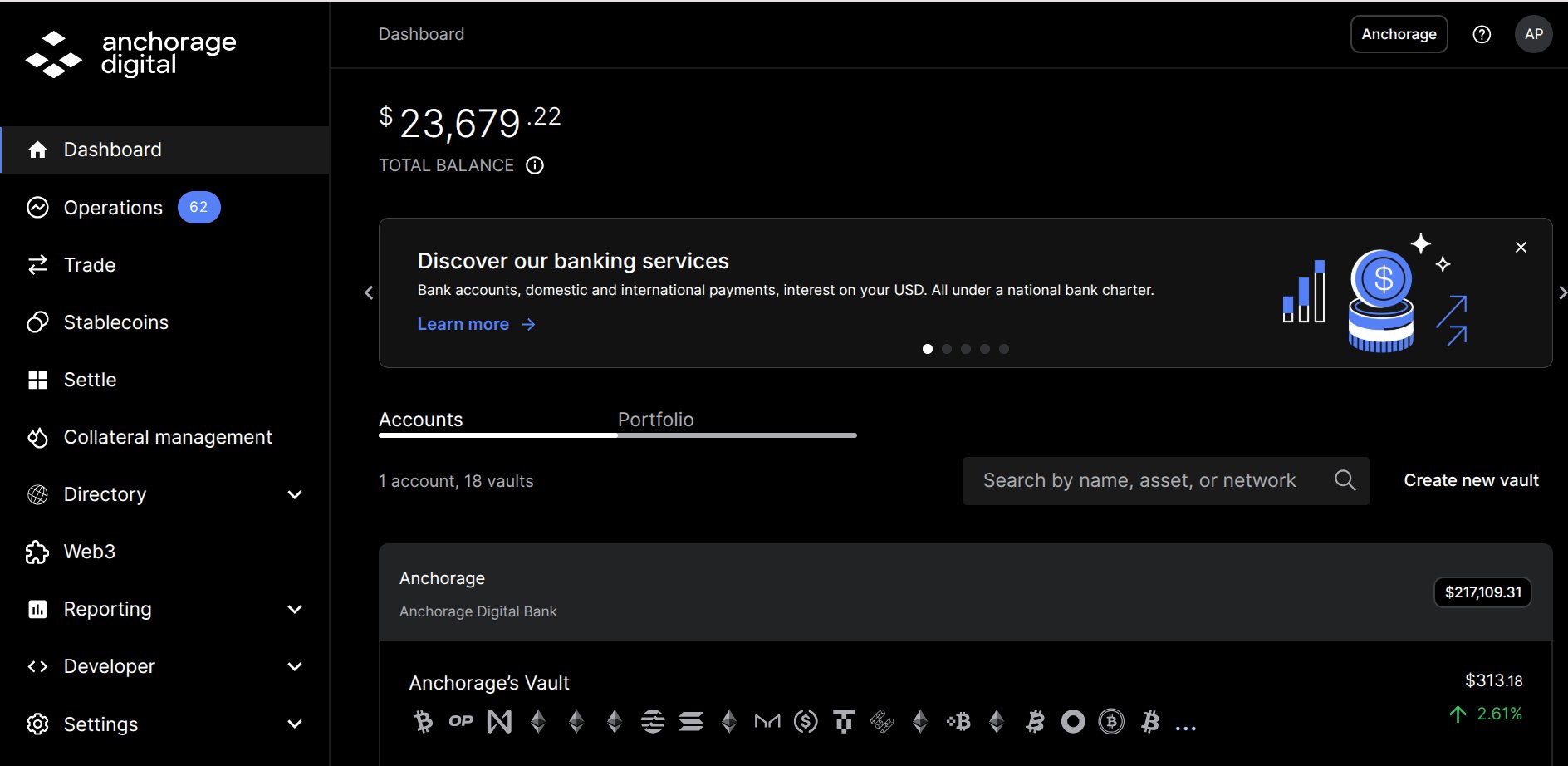
On the **Dashboard**, the total balance at the top of the page is the USD value of the total on-chain balance held in the account, summed across all of its vaults.
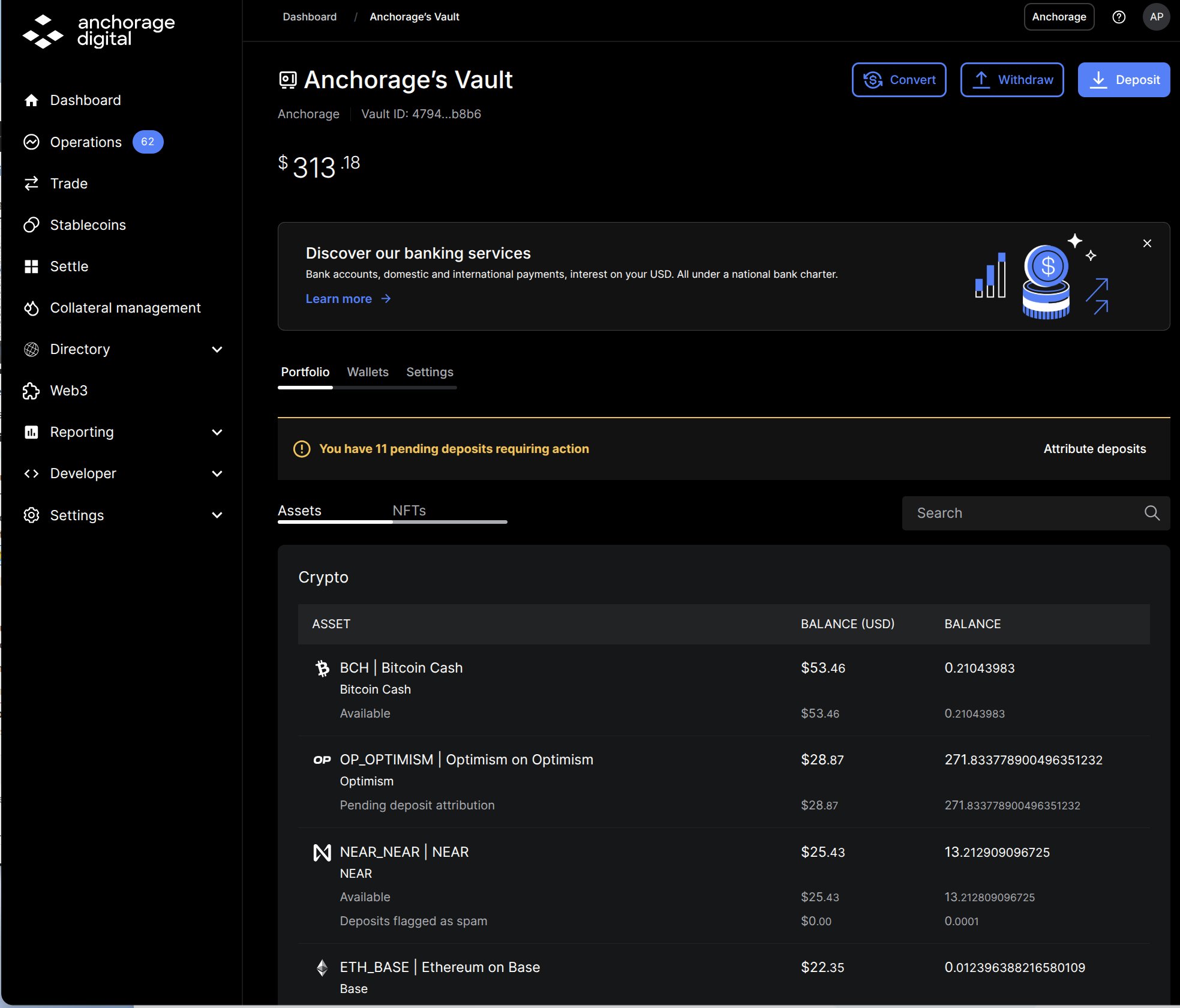
 In vault views, the total balance at the top of the page is the sum of the top-line balances of the assets in that vault, as shown in the **Portfolio** tab.
 ## Line-item balances
Under each asset's top-line balance, the **Portfolio** and **Wallets** views break the amount into labeled line items—for example, **Available** or **Pending deposit attribution**. A line item appears only when its amount isn't zero, so different assets show different rows, and the same concept can carry a network-specific name (see the [asset-specific variants](#asset-specific-staking-variants) below).
### Standard labels
These labels can appear on any asset.
| Label | What it means |
| :------------------------------ | :------------------------------------------------------------------------------------------------------------------------------------------ |
| Available | Funds you can withdraw, transfer, or stake right now |
| Pending | An amount in transition, such as a stake being set up |
| Pending transaction | Held for a pending operation—a withdrawal, transfer, or network fee awaiting completion |
| Pending deposit attribution | A deposit held until you attribute the sender—see [Deposit attributions](/knowledge-base/platform/users/web-dashboard/deposit-attributions) |
| Reviewing attribution | An attributed deposit undergoing compliance screening |
| Unknown originator | A deposit whose sender couldn't be identified |
| Funds blocked | Funds blocked following compliance review |
| Deposits flagged as spam | Deposits you or Anchorage Digital flagged as spam |
| Held by \[API key name] | A hold placed programmatically by one of your API keys |
| Locked for vesting | Funds locked under a vesting or lockup schedule |
| In associated account | Funds held in an associated vesting account |
| Held for executing a settlement | Reserved for an in-flight Atlas settlement |
| Held for Atlas delegation | Reserved for Atlas delegation |
| Held for minting or burning | Reserved for a stablecoin mint or burn in progress |
### Vesting and governance labels
| Label | What it means |
| :---------------------------------------------------------------------- | :---------------------------------------------------------------------------- |
| Locked | Principal locked in the network's lock or vesting contract |
| Unlocked | Funds released from the lock and ready to use |
| Vested / Unvested | Portions of a vesting schedule that have or haven't vested yet |
| Available to be claimed | Vested funds ready to claim |
| Available to be delegated | Funds eligible for delegation |
| Rewards earned (all time) | Cumulative rewards over the life of the position |
| Delegated Voting / Electing Validator | Funds committed to governance voting or validator election |
| Locked for voting / Locked for voting delegation / Locked by vote proxy | MKR committed to Maker governance |
| Stellar network reserve | XLM reserved by the Stellar network for the wallet and its allowlisted assets |
| Unvested delegatable | Unvested funds that can still be delegated (cosmos-family vesting positions) |
### Staking labels
Stakeable assets also show a staking summary with three columns that are always present: **Available to stake**, **Amount staked**, and **Unclaimed rewards**. The line items below appear as they apply.
| Label | What it means |
| :-------------------------------------- | :------------------------------------------------------------------------------------------ |
| Staked | Principal currently delegated to a validator |
| Unbonding / Unstaking | An unstake in progress, waiting out the network's unbonding period |
| Available to be withdrawn | Unstaked funds ready to collect |
| Available to claim / Delegation Rewards | Staking rewards earned but not yet claimed |
| Available to claim (ex: BTC staking) | Unclaimed rewards attributed to a specific program—for example, Babylon BTC staking rewards |
| Restaking rewards to be claimed | Unclaimed restaking rewards |
| Redelegating | A delegation moving between validators (Cosmos-family networks) |
| Staking Reserve | A small operational reserve required by the network for staking |
### Asset-specific staking variants
Some networks name the same staking concepts differently. Labels you may see instead:
| Asset or network | Labels |
| :----------------------------------------------------------------- | :------------------------------------------------------------------------------------------------------------------------------------------- |
| Ethereum (ETH) | Stake Pending; Rewards to be claimed; Restaked; Restaked in Beacon Chain; Alluvial Staking Pending / Staked / Unstaking / Unstaked / Unswept |
| Bitcoin (BTC, Babylon) | Unbonding; Inactive stake |
| Solana (SOL) | Staking in Progress; Staked (Deactivating); Inactive Stake; Rent Reserve - Wallet; Rent Reserve - Stake Account(s) |
| Sui (SUI) | Staked Principal; Staked Rewards |
| Aptos (APT) | Unlocked stake to be withdrawn |
| Tron (TRX) | Inactive Stake - Frozen (frozen principal); Staked (voting delegation); Inactive Stake - Available to Collect; Unclaimed Rewards |
| HYPE (HyperCore) | Available - Spot account; Inactive stake - Stake account |
| SEI, Monad, Stable | Unstaking; Inactive stake; Available to claim |
| Starknet tokens | Unstaked; Available to claim |
| Avalanche P-Chain | Available to import |
| EigenLayer and liquid staking tokens (cbETH, LsETH, ETHx, sfrxETH) | Restaked; Restaked Delegated; Unstaked |
| Flow (FLOW) | Delegated; Delegated available and vested; Rewards; Rent Reserve - Wallet; Rent Reserve - Locked Account |
| Oasis (ROSE) | Delegated |
For how staking works and per-asset guides, see [Staking overview](/knowledge-base/platform/users/staking/overview).
## Line-item balances
Under each asset's top-line balance, the **Portfolio** and **Wallets** views break the amount into labeled line items—for example, **Available** or **Pending deposit attribution**. A line item appears only when its amount isn't zero, so different assets show different rows, and the same concept can carry a network-specific name (see the [asset-specific variants](#asset-specific-staking-variants) below).
### Standard labels
These labels can appear on any asset.
| Label | What it means |
| :------------------------------ | :------------------------------------------------------------------------------------------------------------------------------------------ |
| Available | Funds you can withdraw, transfer, or stake right now |
| Pending | An amount in transition, such as a stake being set up |
| Pending transaction | Held for a pending operation—a withdrawal, transfer, or network fee awaiting completion |
| Pending deposit attribution | A deposit held until you attribute the sender—see [Deposit attributions](/knowledge-base/platform/users/web-dashboard/deposit-attributions) |
| Reviewing attribution | An attributed deposit undergoing compliance screening |
| Unknown originator | A deposit whose sender couldn't be identified |
| Funds blocked | Funds blocked following compliance review |
| Deposits flagged as spam | Deposits you or Anchorage Digital flagged as spam |
| Held by \[API key name] | A hold placed programmatically by one of your API keys |
| Locked for vesting | Funds locked under a vesting or lockup schedule |
| In associated account | Funds held in an associated vesting account |
| Held for executing a settlement | Reserved for an in-flight Atlas settlement |
| Held for Atlas delegation | Reserved for Atlas delegation |
| Held for minting or burning | Reserved for a stablecoin mint or burn in progress |
### Vesting and governance labels
| Label | What it means |
| :---------------------------------------------------------------------- | :---------------------------------------------------------------------------- |
| Locked | Principal locked in the network's lock or vesting contract |
| Unlocked | Funds released from the lock and ready to use |
| Vested / Unvested | Portions of a vesting schedule that have or haven't vested yet |
| Available to be claimed | Vested funds ready to claim |
| Available to be delegated | Funds eligible for delegation |
| Rewards earned (all time) | Cumulative rewards over the life of the position |
| Delegated Voting / Electing Validator | Funds committed to governance voting or validator election |
| Locked for voting / Locked for voting delegation / Locked by vote proxy | MKR committed to Maker governance |
| Stellar network reserve | XLM reserved by the Stellar network for the wallet and its allowlisted assets |
| Unvested delegatable | Unvested funds that can still be delegated (cosmos-family vesting positions) |
### Staking labels
Stakeable assets also show a staking summary with three columns that are always present: **Available to stake**, **Amount staked**, and **Unclaimed rewards**. The line items below appear as they apply.
| Label | What it means |
| :-------------------------------------- | :------------------------------------------------------------------------------------------ |
| Staked | Principal currently delegated to a validator |
| Unbonding / Unstaking | An unstake in progress, waiting out the network's unbonding period |
| Available to be withdrawn | Unstaked funds ready to collect |
| Available to claim / Delegation Rewards | Staking rewards earned but not yet claimed |
| Available to claim (ex: BTC staking) | Unclaimed rewards attributed to a specific program—for example, Babylon BTC staking rewards |
| Restaking rewards to be claimed | Unclaimed restaking rewards |
| Redelegating | A delegation moving between validators (Cosmos-family networks) |
| Staking Reserve | A small operational reserve required by the network for staking |
### Asset-specific staking variants
Some networks name the same staking concepts differently. Labels you may see instead:
| Asset or network | Labels |
| :----------------------------------------------------------------- | :------------------------------------------------------------------------------------------------------------------------------------------- |
| Ethereum (ETH) | Stake Pending; Rewards to be claimed; Restaked; Restaked in Beacon Chain; Alluvial Staking Pending / Staked / Unstaking / Unstaked / Unswept |
| Bitcoin (BTC, Babylon) | Unbonding; Inactive stake |
| Solana (SOL) | Staking in Progress; Staked (Deactivating); Inactive Stake; Rent Reserve - Wallet; Rent Reserve - Stake Account(s) |
| Sui (SUI) | Staked Principal; Staked Rewards |
| Aptos (APT) | Unlocked stake to be withdrawn |
| Tron (TRX) | Inactive Stake - Frozen (frozen principal); Staked (voting delegation); Inactive Stake - Available to Collect; Unclaimed Rewards |
| HYPE (HyperCore) | Available - Spot account; Inactive stake - Stake account |
| SEI, Monad, Stable | Unstaking; Inactive stake; Available to claim |
| Starknet tokens | Unstaked; Available to claim |
| Avalanche P-Chain | Available to import |
| EigenLayer and liquid staking tokens (cbETH, LsETH, ETHx, sfrxETH) | Restaked; Restaked Delegated; Unstaked |
| Flow (FLOW) | Delegated; Delegated available and vested; Rewards; Rent Reserve - Wallet; Rent Reserve - Locked Account |
| Oasis (ROSE) | Delegated |
For how staking works and per-asset guides, see [Staking overview](/knowledge-base/platform/users/staking/overview).