> ## Documentation Index
> Fetch the complete documentation index at: https://docs.anchorage.com/llms.txt
> Use this file to discover all available pages before exploring further.
# Adding subquorums
> Create nested approval structures with subquorums for complex approval flows.
Subquorums allow you to create nested approval requirements — for example, "2 of 3 people from Department A, OR 1 person from Department B." This enables complex, flexible approval structures for sophisticated organizations.
Subquorums are an advanced feature. Standard quorum requirements may be sufficient for most organizations. Ask your administrator if subquorums are enabled for your organization.
## What is a subquorum
A subquorum is a group of approvers with its own quorum requirement. Multiple subquorums can be combined into a single policy using logical operators (AND, OR).
**Example:**
* Subquorum A: 2 of 3 CFO, Controller, Treasurer
* Subquorum B: VP of Risk
* Policy: (Subquorum A) AND (Subquorum B)
* Result: Both the finance group AND the risk officer must approve
## When to use subquorums
Use subquorums when:
* **Distributed approval** — Different departments must approve different aspects
* **Escalation tiers** — Different approval groups for different severity levels
* **Specialist sign-off** — Legal, compliance, or other specialists must approve certain operations
* **Backup approvers** — Alternative approval paths if primary approvers unavailable
* **Multi-entity** — Multiple legal entities in one vault each need to approve
**Example scenarios:**
| Scenario | Subquorum structure |
| :---------------------------------------- | :-------------------------------------------- |
| Treasury + Risk approval | (2 of 3 treasury) AND (1 of 2 risk) |
| Any investor can approve, or fund manager | (1 of 10 investors) OR (fund manager) |
| Escalated withdrawals | (1 of 3 operations) AND (1 CFO) |
| Multi-geography | (1 of 2 US officers) AND (1 of 2 EU officers) |
## Add a subquorum
Go to **Settings** > **Policies** > **Vault policy**.
Look for **Add subquorum**, **Create approval group**, or **Nested quorum**.
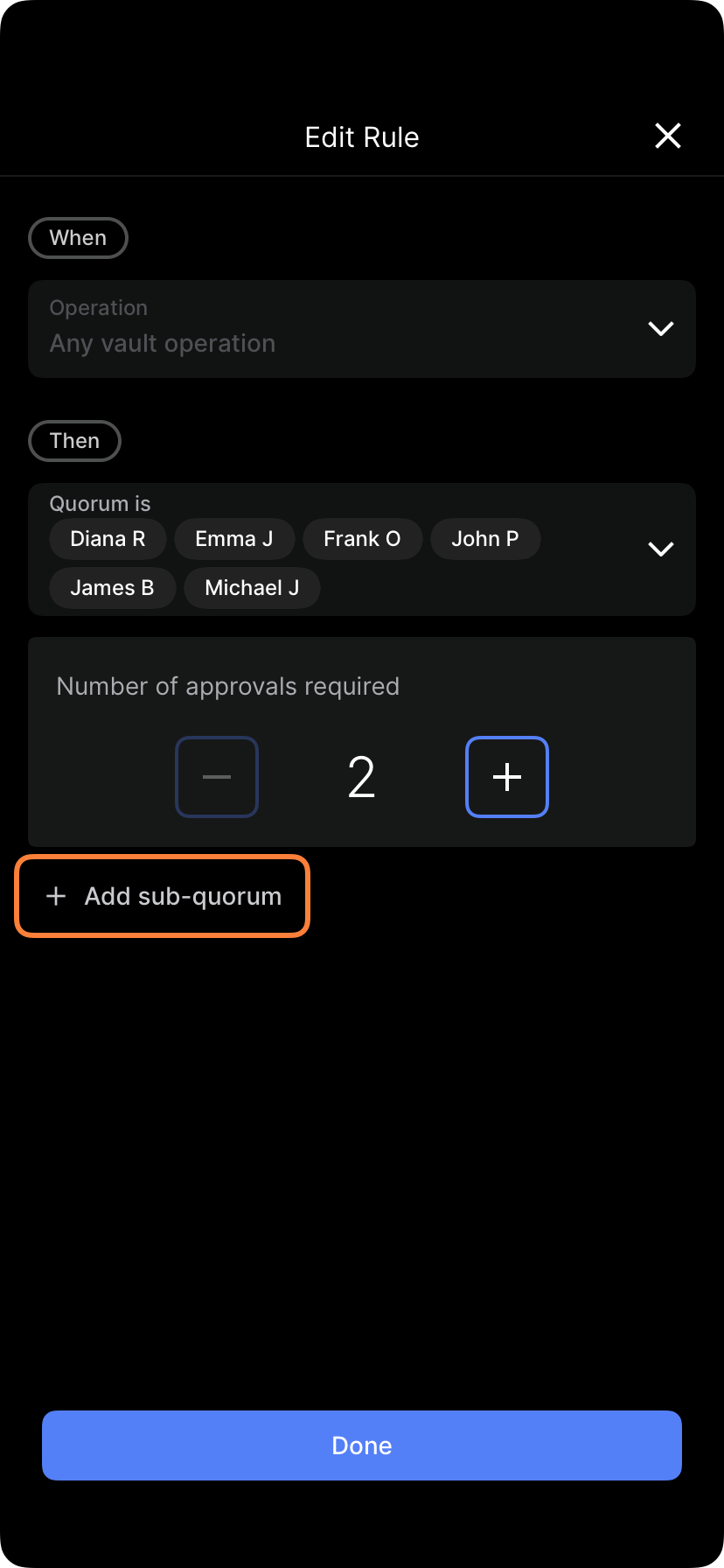 Tap **Add subquorum** or **Create group**.
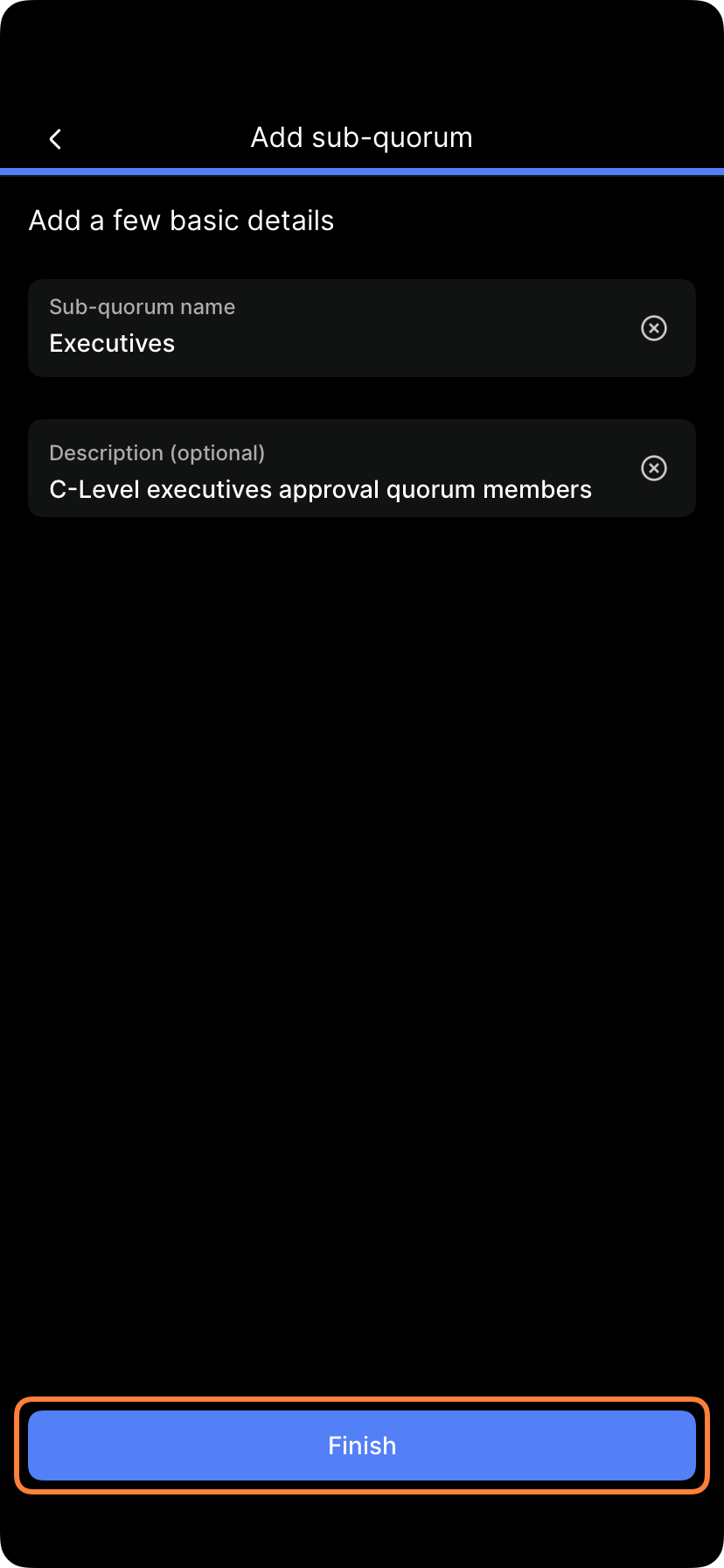
Give it a descriptive name (e.g., "Treasury Committee," "Risk Officers," "Legal Signatories").
Select which users are members of this subquorum.
Tap **Add subquorum** or **Create group**.
Give it a descriptive name (e.g., "Treasury Committee," "Risk Officers," "Legal Signatories").
Select which users are members of this subquorum.
 How many of these members must approve?
* 1 of X: Any one member
* 2 of X: Any two members
* All of X: All members required
How many of these members must approve?
* 1 of X: Any one member
* 2 of X: Any two members
* All of X: All members required
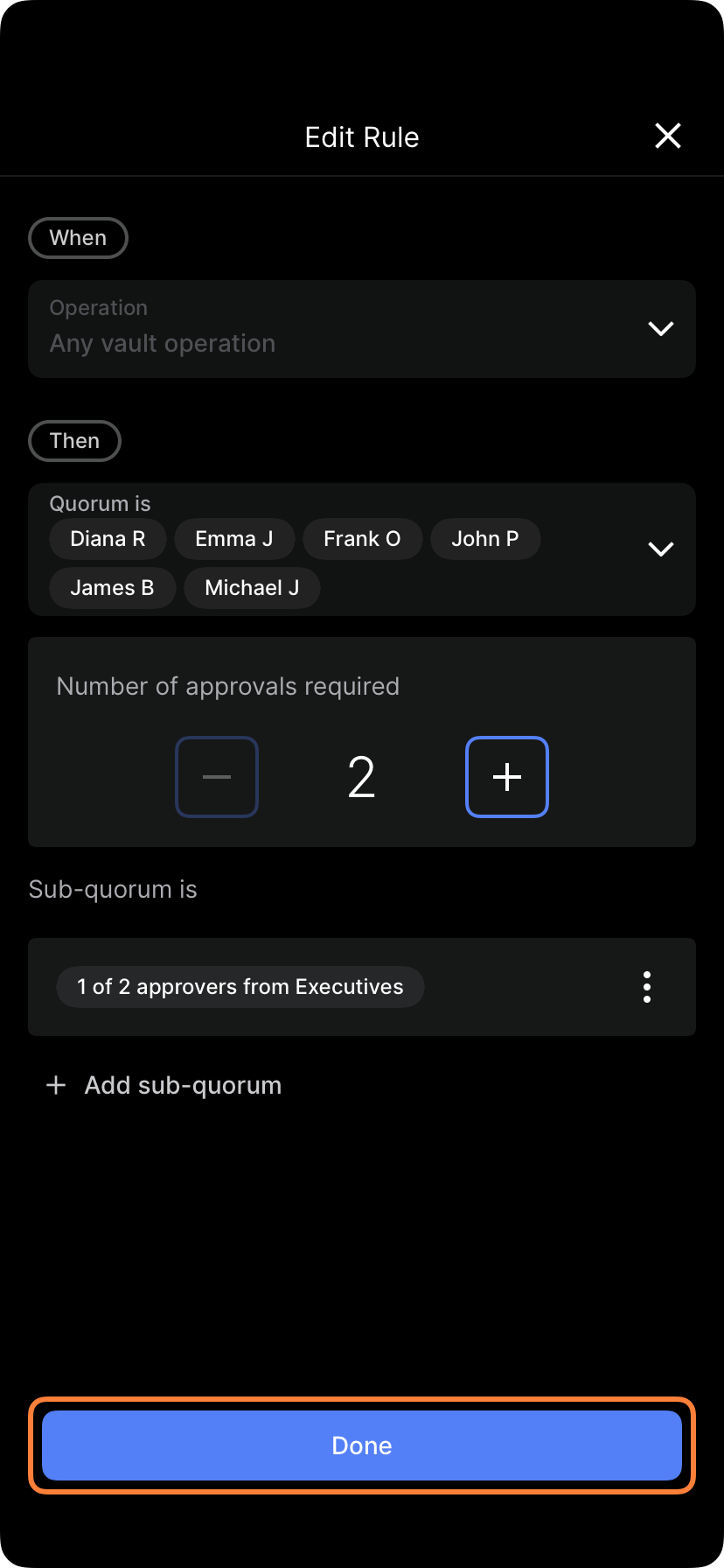 Tap **Save** or **Create group**.
Repeat to create additional subquorum groups.
Specify how subquorums relate to each other:
* **AND:** Both subquorums must approve
* **OR:** Either subquorum can approve
* **Advanced:** Weighted or complex combinations
Tap **Save policy** or **Apply changes**. The new subquorum structure takes effect.
If policy changes require approval, the new subquorum must be approved.
## Subquorum examples
### Example 1: Finance + Risk
**Subquorum A (Finance):** 2 of \{CFO, Controller, Treasurer}
**Subquorum B (Risk):** 1 of \{VP Risk, Compliance Officer}
**Requirement:** Finance AND Risk (both must approve)
**Result:** For a large withdrawal, the CFO and Controller must both approve, AND the VP Risk must also approve.
### Example 2: Any specialized approver OR escalated
**Subquorum A (Regular):** 1 of \{Treasurer, Assistant Treasurer}
**Subquorum B (Backup):** CFO
**Requirement:** Subquorum A OR Subquorum B
**Result:** For routine operations, one Treasurer is enough. If both are unavailable, the CFO can approve as backup.
### Example 3: Multi-geography
**Subquorum A (US):** 1 of \{CEO US, CFO US}
**Subquorum B (EU):** 1 of \{CEO EU, CFO EU}
**Requirement:** US AND EU (both regions must approve)
**Result:** Major operations require one approver from US and one from EU.
### Example 4: Escalating approval
**Small transactions (\<\$100k):**
* Subquorum A: 1 of 3 operations staff
**Large transactions (>\$100k):**
* Subquorum A: 1 of 3 operations staff
* Subquorum B: CFO
* Requirement: A AND B (both required for large)
**Result:** Small transactions are fast; large ones require operations + CFO.
## Subquorum member management
### Adding members to a subquorum
Go to **Settings** > **Policies** > **Vault policy**.
Locate the subquorum you want to modify.
Select **Edit subquorum** or the **pencil** icon.
Tap **Add member** and select a user.
Tap **Save** or **Update**.
### Removing members from a subquorum
Locate the subquorum in your vault policies.
Select **Edit**.
Find the member you want to remove and tap **Remove** or the **X** button.
Tap **Save** or **Update**.
**Important:** If you reduce members below the quorum requirement (e.g., remove someone from a "2 of 3" subquorum, leaving 2 members), the quorum becomes "2 of 2" (all required).
## Subquorum naming best practices
Use clear, descriptive names:
| Good name | Avoid |
| :------------------- | :--------- |
| "Treasury Committee" | "Group 1" |
| "Risk Officers" | "SQ1" |
| "US Signatories" | "A" |
| "Backup Approvers" | "Quorum 2" |
Clear names help users understand approval flows.
## Complex subquorum structures
For advanced setups, you can combine subquorums with rules:
**Example: Tiered approval with subquorums**
* **Small withdrawals (\<\$50k):** Subquorum A (1 of 2 treasurers)
* **Medium ($50k - $500k):** Subquorum A AND Subquorum B (treasurers + CFO)
* **Large (>\$500k):** Subquorum A AND Subquorum B AND Subquorum C (treasurers + CFO + CEO)
This creates an escalating approval structure where larger operations require more oversight.
## Approval of subquorum changes
Adding new subquorums requires approval:
* **Submitter:** The person creating the subquorum
* **Approvers:** Based on your admin policy
* **Audit trail:** Creation is recorded with all details
* **Effective date:** Takes effect immediately after approval
## Common mistakes with subquorums
**Mistake 1: Impossible requirements**
* "2 of 2" when you need fallback (too strict)
* Solution: Use "1 of 2" with escalation rule
**Mistake 2: Redundant subquorums**
* Creating two nearly identical subquorums
* Solution: Use one subquorum and adjust the requirement
**Mistake 3: Too complex**
* 5+ nested subquorums with multiple AND/OR combinations
* Solution: Simplify; most organizations need at most 3-4 subquorums
**Mistake 4: Stale members**
* Subquorum includes people who've left the organization
* Solution: Regularly review and update subquorum membership
## Documenting subquorum structures
Document your subquorum design:
```
Vault: Treasury
Subquorum A (Finance Committee):
- Members: CFO, Controller, Treasurer
- Requirement: 2 of 3
- Purpose: Daily operations approval
Subquorum B (Risk):
- Members: VP Risk, Compliance Officer
- Requirement: 1 of 2
- Purpose: Risk assessment and approval
Policy requirement: Finance Committee AND Risk approves
Examples:
- Withdrawal $50k: CFO + Controller (Finance) + Compliance Officer (Risk) approve
- Withdrawal $200k: Same as above
- All withdrawals require both subquorum approvals
```
## Testing subquorum structure
Before finalizing, test your structure:
1. **Trace through scenarios** — Mentally trace an operation through your subquorum approval
2. **Check for gaps** — Can every operation find a valid approval path?
3. **Verify fallback paths** — If one approver is unavailable, can others still approve?
4. **Confirm no deadlocks** — Is any approval path impossible?
See [Managing rules](/knowledge-base/porto/policies/managing-rules) for ongoing subquorum management and [Editing subquorums](/knowledge-base/porto/policies/editing-subquorums) for modification instructions.
Tap **Save** or **Create group**.
Repeat to create additional subquorum groups.
Specify how subquorums relate to each other:
* **AND:** Both subquorums must approve
* **OR:** Either subquorum can approve
* **Advanced:** Weighted or complex combinations
Tap **Save policy** or **Apply changes**. The new subquorum structure takes effect.
If policy changes require approval, the new subquorum must be approved.
## Subquorum examples
### Example 1: Finance + Risk
**Subquorum A (Finance):** 2 of \{CFO, Controller, Treasurer}
**Subquorum B (Risk):** 1 of \{VP Risk, Compliance Officer}
**Requirement:** Finance AND Risk (both must approve)
**Result:** For a large withdrawal, the CFO and Controller must both approve, AND the VP Risk must also approve.
### Example 2: Any specialized approver OR escalated
**Subquorum A (Regular):** 1 of \{Treasurer, Assistant Treasurer}
**Subquorum B (Backup):** CFO
**Requirement:** Subquorum A OR Subquorum B
**Result:** For routine operations, one Treasurer is enough. If both are unavailable, the CFO can approve as backup.
### Example 3: Multi-geography
**Subquorum A (US):** 1 of \{CEO US, CFO US}
**Subquorum B (EU):** 1 of \{CEO EU, CFO EU}
**Requirement:** US AND EU (both regions must approve)
**Result:** Major operations require one approver from US and one from EU.
### Example 4: Escalating approval
**Small transactions (\<\$100k):**
* Subquorum A: 1 of 3 operations staff
**Large transactions (>\$100k):**
* Subquorum A: 1 of 3 operations staff
* Subquorum B: CFO
* Requirement: A AND B (both required for large)
**Result:** Small transactions are fast; large ones require operations + CFO.
## Subquorum member management
### Adding members to a subquorum
Go to **Settings** > **Policies** > **Vault policy**.
Locate the subquorum you want to modify.
Select **Edit subquorum** or the **pencil** icon.
Tap **Add member** and select a user.
Tap **Save** or **Update**.
### Removing members from a subquorum
Locate the subquorum in your vault policies.
Select **Edit**.
Find the member you want to remove and tap **Remove** or the **X** button.
Tap **Save** or **Update**.
**Important:** If you reduce members below the quorum requirement (e.g., remove someone from a "2 of 3" subquorum, leaving 2 members), the quorum becomes "2 of 2" (all required).
## Subquorum naming best practices
Use clear, descriptive names:
| Good name | Avoid |
| :------------------- | :--------- |
| "Treasury Committee" | "Group 1" |
| "Risk Officers" | "SQ1" |
| "US Signatories" | "A" |
| "Backup Approvers" | "Quorum 2" |
Clear names help users understand approval flows.
## Complex subquorum structures
For advanced setups, you can combine subquorums with rules:
**Example: Tiered approval with subquorums**
* **Small withdrawals (\<\$50k):** Subquorum A (1 of 2 treasurers)
* **Medium ($50k - $500k):** Subquorum A AND Subquorum B (treasurers + CFO)
* **Large (>\$500k):** Subquorum A AND Subquorum B AND Subquorum C (treasurers + CFO + CEO)
This creates an escalating approval structure where larger operations require more oversight.
## Approval of subquorum changes
Adding new subquorums requires approval:
* **Submitter:** The person creating the subquorum
* **Approvers:** Based on your admin policy
* **Audit trail:** Creation is recorded with all details
* **Effective date:** Takes effect immediately after approval
## Common mistakes with subquorums
**Mistake 1: Impossible requirements**
* "2 of 2" when you need fallback (too strict)
* Solution: Use "1 of 2" with escalation rule
**Mistake 2: Redundant subquorums**
* Creating two nearly identical subquorums
* Solution: Use one subquorum and adjust the requirement
**Mistake 3: Too complex**
* 5+ nested subquorums with multiple AND/OR combinations
* Solution: Simplify; most organizations need at most 3-4 subquorums
**Mistake 4: Stale members**
* Subquorum includes people who've left the organization
* Solution: Regularly review and update subquorum membership
## Documenting subquorum structures
Document your subquorum design:
```
Vault: Treasury
Subquorum A (Finance Committee):
- Members: CFO, Controller, Treasurer
- Requirement: 2 of 3
- Purpose: Daily operations approval
Subquorum B (Risk):
- Members: VP Risk, Compliance Officer
- Requirement: 1 of 2
- Purpose: Risk assessment and approval
Policy requirement: Finance Committee AND Risk approves
Examples:
- Withdrawal $50k: CFO + Controller (Finance) + Compliance Officer (Risk) approve
- Withdrawal $200k: Same as above
- All withdrawals require both subquorum approvals
```
## Testing subquorum structure
Before finalizing, test your structure:
1. **Trace through scenarios** — Mentally trace an operation through your subquorum approval
2. **Check for gaps** — Can every operation find a valid approval path?
3. **Verify fallback paths** — If one approver is unavailable, can others still approve?
4. **Confirm no deadlocks** — Is any approval path impossible?
See [Managing rules](/knowledge-base/porto/policies/managing-rules) for ongoing subquorum management and [Editing subquorums](/knowledge-base/porto/policies/editing-subquorums) for modification instructions.