

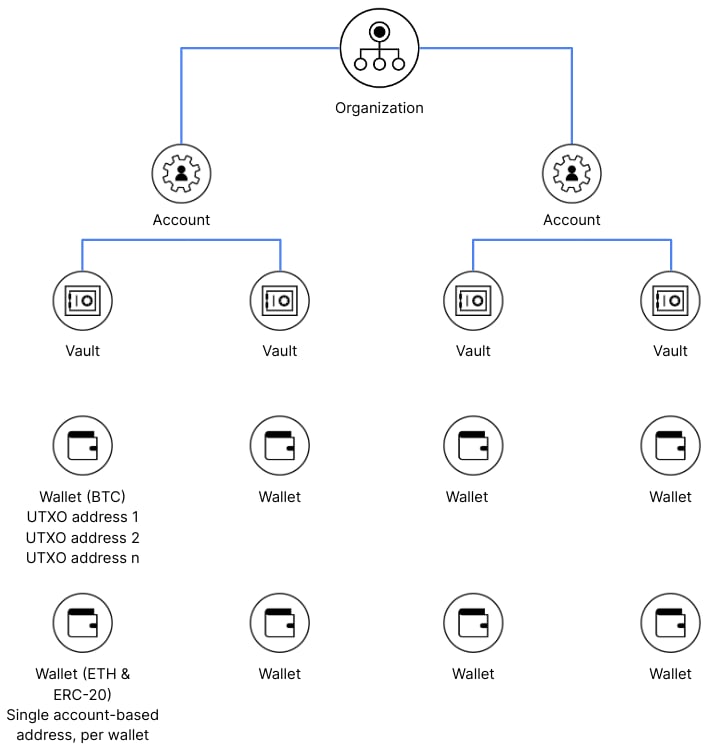
Organizations
At Anchorage Digital, the organization is the highest hierarchical classification within the product, where a client or partner of Anchorage Digital is onboarded. Clients may have one or many accounts under each organization.Accounts
Each organization can have multiple accounts. Each account can be its own legal entity under the parent organization, or a part of the legal parent organization. This enables parent organizations to onboard separate business entities while maintaining separate ownership of assets at the account level. Accounts can also be used to onboard end customers (program customers) under the control of the middle-B partner (partner platform) for business-to-business-to-business (B2B2B) or business-to-business-to-consumer (B2B2C) use cases. For more information, contact our client experience team at accountexecutive@anchorage.com.Vaults
Under each account, there may be one or many vaults. A vault is Anchorage Digital’s way of organizing asset wallets and user and API key permissions. If the organization has multiple vaults, each one can be managed by the same or separate admins on the account. Each vault has its own security and quorum approval policy. Admins elect who manages each vault and how many vault members constitute a quorum for sensitive transactions or activities within the vault. Vaults can hold single or multiple assets, depending on the use case. Each vault also has its ownvaultId, used to request or filter API responses, including withdrawals, trades, and transfers.
The
vaultId is uniquely identifiable across the Anchorage Digital platform and can be used to reference a vault using Anchorage Digital’s APIs. You can find the vaultId field by hitting the list vaults endpoint. Only the vaults provisioned on the API key are returned.View your account structure
Wallets hold balances for a specific asset within a vault, and each vault can contain multiple wallets—one per asset type. As you map your account structure, useGET /v2/wallets to list every wallet your API key can access across all permissioned vaults.
Wallets
Under each vault, there may be multiple wallets. A wallet at Anchorage Digital is similar to a traditional crypto wallet, with slight nuances to match the structure of Anchorage Digital’s platform capabilities and services. Anchorage Digital wallets are tied to a particular blockchain and serve as a flexible way to aggregate and manage assets. This removes the complexity and need for users to manage multiple addresses, while maintaining the ability to trace assets and view separate on-chain interactions. There may also be multiple wallets on the same blockchain within the same vault, if needed to support the use case.Wallet creation
All active members of a vault can create a wallet via the create wallet API, which doesn’t require quorum approval. Wallet addresses can be reused, although they can’t be deleted once generated in a vault, as they remain live on the blockchain.Default wallet
If there are multiple wallets for the same blockchain within a single vault, the first wallet created for each specific blockchain is designated as the default wallet. The following operations require the default wallet, as these are specified at the vault level and the default wallet is the source of funds:- External withdrawals
- Settlement of funds from Anchorage Digital trading into client vaults
- Execution of a hold via API
UTXO vs. account-based wallets
Anchorage Digital uses various asset wallet models: account-based and unspent transaction output (UTXO) wallets. The conceptual difference is that the account model updates user balances globally. The UTXO model only records transaction receipts. In the UTXO model, account balances are calculated on the client side by adding up the available unspent transaction outputs (UTXOs). When a transaction uses more funds than needed from a source address, the remainder (or “change”) is sent to a new change address within the wallet. These change addresses are automatically managed and are part of the wallet’s balance.Balances
Each asset in an Anchorage Digital vault contains anavailableBalance and a totalBalance:
availableBalanceis the balance of funds available to be withdrawn or transferred. Use this value when reading balances for client balance monitoring or evaluating sufficient client funds. This balance excludes any funds that are held, in progress, or locked.totalBalanceis the total amount of assets under custody within the vault. This balance may contain funds that are in progress or locked for activities like voting. It’s always greater than or equal to theavailableBalance.
GET /vaults and GET /vaults/{vaultId}/wallets return one balance row per wallet, not one row per vault. If a vault holds the same asset in two different wallets, the response includes two separate rows—each tied to its own walletId—rather than a single rolled-up total for the vault. Sum the rows yourself when you need a vault-level total for an asset.