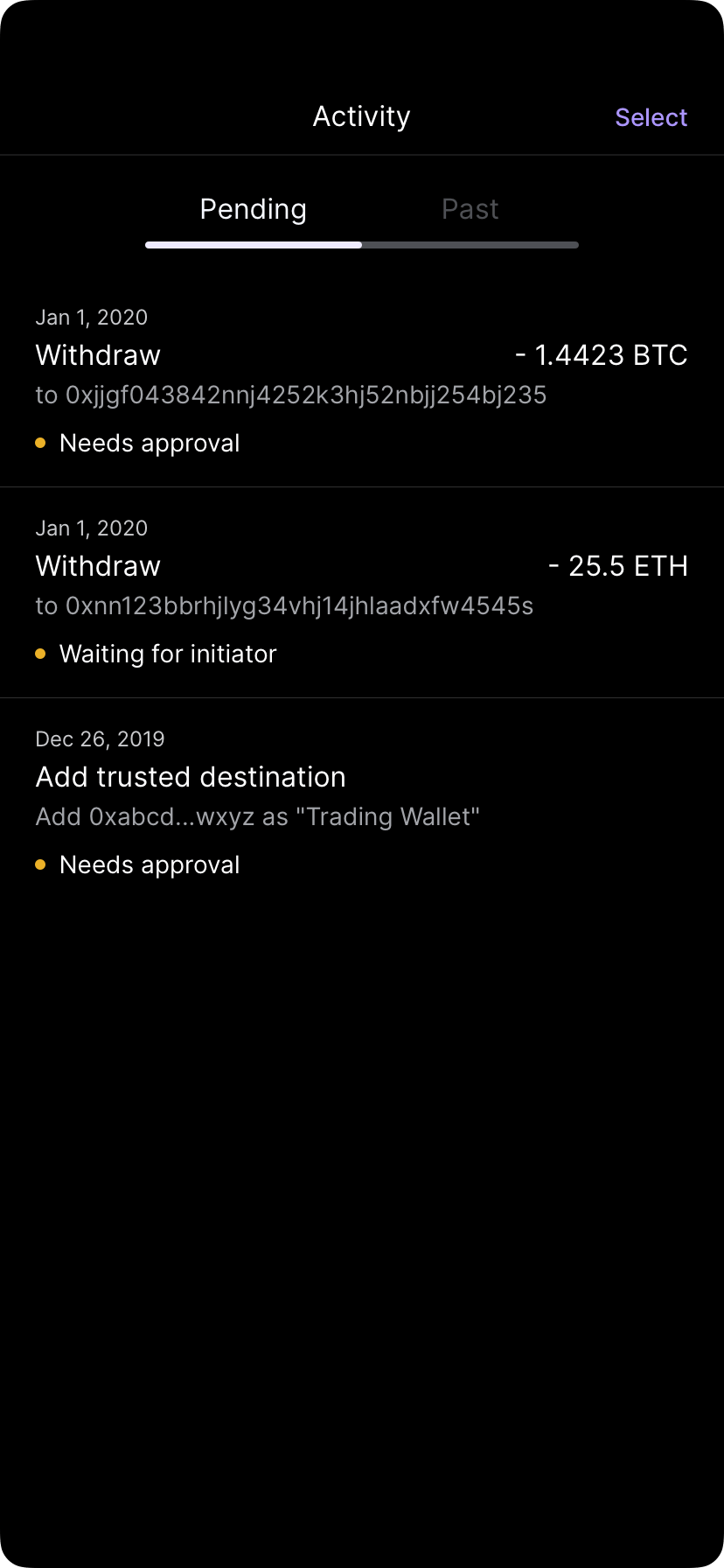
Activity shows a complete audit trail of every operation in your vaults—from deposits and withdrawals to policy changes and user management. Use activity to track status, verify transactions, and maintain compliance records.

View activity

1

Open the activity screen

From the home screen, tap the Activity icon (looks like a timeline or history icon).
Activity screen displaying recent transactions in chronological order
2

Browse transactions

Activity displays recent operations in reverse chronological order (newest first).
3

Tap a transaction

Select any transaction to see full details, including status, approvals, and blockchain information.

Activity types

Activity includes all operations:
  • Deposits — Assets received into your vaults
  • Withdrawals — Assets sent from your vaults
  • Transfers — Movements between your vaults or to trusted partners
  • Swaps — Asset exchanges (if stablecoin conversion is enabled)
  • User management — Users added, removed, or had permissions changed
  • Policy changes — Updates to admin policies, quorum rules, or vault policies
  • Settings changes — Changes to organization settings or vault configurations
  • Approvals — Operations approved or rejected

Transaction status

Each transaction shows its current status:

Transaction details

When you tap a transaction, you’ll see:
  • Basic info — Type (deposit, withdrawal, etc.), amount, asset, timestamp
  • Parties involved — Who initiated and who approved
  • Approvals — List of approvers and their sign-off times
  • Blockchain info — Transaction hash (if on-chain), network, confirmation count
  • Comments — Any notes added during initiation
  • History — Timeline of when the transaction entered each status
Use the filters in activity to find specific transactions:
  • Asset type — Show only transactions for a specific asset
  • Type — Filter by operation type (deposits, withdrawals, policy changes, etc.)
  • Date range — Show transactions within a specific time period
  • Status — View only pending, completed, or failed operations
  • Vault — View activity for a specific vault
Filter menu showing options to filter by asset, type, date, status, and vault

Pending approvals

Transactions awaiting approval show a Pending approval badge. To see what needs approval:
1

Look for pending transactions

Pending items appear at the top of activity with a Pending badge.
2

Tap the transaction

View who still needs to approve and when it expires.
3

Approve if authorized

If you’re a designated approver, you can approve directly in the activity view (if your role permits).
4

Escalate if stuck

If approvals are delayed, contact your organization’s approvers directly.
Pending approvals typically expire after 24 hours if not completed. Once expired, the operation must be resubmitted.

Failed or stuck transactions

If a transaction failed or is stuck:
  1. Check the status — Tap the transaction to see where it failed
  2. Common reasons for failure:
    • Insufficient balance or gas fees
    • Policy rejection by compliance team
    • Blockchain network congestion (on-chain pending)
    • Approval timeout (older than 24 hours)
  3. Retry options — Depending on the failure reason, you may be able to resubmit or contact support

Export activity

To download your activity for accounting or compliance purposes:
1

Open activity filters

Tap the filter icon to narrow down what you want to export.
2

Look for export option

Tap Export or Download (availability depends on your permissions).
3

Choose format

Select CSV or PDF format.
4

Save to device

The file will download and be saved locally.
Export may require admin approval or specific permissions. Contact your administrator if you don’t see the export option.

Activity and compliance

Your activity log serves as an audit trail for:
  • Regulatory reporting — Compliance with AML/KYC requirements
  • Internal audits — Verifying who initiated each operation and when
  • Tax reporting — Tracking cost basis and transaction dates
  • Dispute resolution — Proving when transactions were initiated and approved
Preserve your activity records for regulatory compliance periods.