

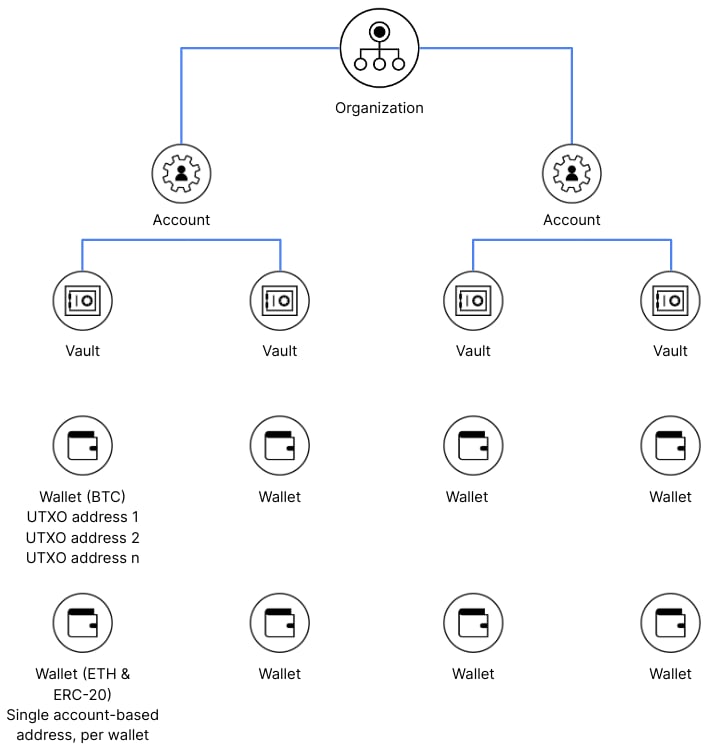
Organizations
The organization is the top level of the hierarchy — it represents your institution’s relationship with Anchorage Digital. An organization can contain one or many accounts.Accounts
Each organization can have multiple accounts. An account can represent its own legal entity under the parent organization, or a division of the parent organization. This lets you onboard separate business entities while keeping asset ownership separate at the account level. For organizations serving their own end clients (B2B2B or B2B2C use cases), accounts can also represent end customers under your control. See B2B2X accounts for details on structuring multi-client accounts.Vaults
Under each account, there may be one or many vaults. A vault is how you organize wallets and control who can access and transact with the assets inside. Each vault has its own security and quorum approval policy. Administrators choose who manages each vault and how many members constitute a quorum for sensitive operations. Vaults can hold single or multiple assets depending on your needs. See Creating vaults for setup instructions and Vault policies for configuring approval rules.Wallets
Each vault contains one or more wallets. A wallet holds a specific asset and provides the deposit addresses you share with counterparties. Wallets work differently depending on the blockchain model:- Account-based wallets (e.g., Ethereum) contain a single address shared across all tokens on that network. ETH and ERC-20 tokens in the same wallet use the same deposit address.
- UTXO wallets (e.g., Bitcoin) can have multiple addresses, all pooled to the same wallet. New addresses are generated automatically during transactions to handle change.
Each vault can hold only one USD wallet. See USD banking for details on fiat wallets.
Balances
Each asset in a vault carries two balances:- Available balance — funds you can withdraw, transfer, or stake right now. This excludes any funds that are held, in progress, or locked.
- Total balance — the total amount of the asset under custody, including funds that are pending, locked for voting, or otherwise in transition. This is always greater than or equal to the available balance.